Before you start
Do these once, in order. When the last one is done, start the steps below.
Set up the jailbroken iPhone
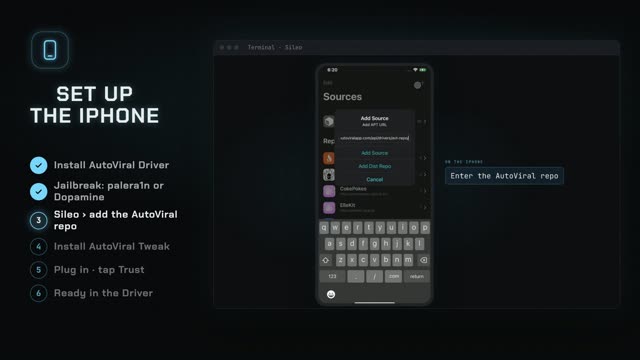 ▶ Watch: Set up a jailbroken iPhonethe setup video and steps
- Install AutoViral Driver on your computer and sign in. Getting started · full Driver walkthrough
- Jailbreak the iPhone: palera1n for iPhone X and older, Dopamine for iPhone XS and newer. Finish with Sileo installed. Jailbroken iPhone setup
- In Sileo open Sources › Add, enter https://autoviralapp.com/api/drivers/avt-repo/ and install AutoViral Tweak. Respring when Sileo asks.
- Plug the iPhone into the computer, unlock it and tap Trust. It shows as ready in the Driver and in your dashboard within about half a minute.
Set up Mimic
- Buy Mimic in Premium › Mimic. It covers phones in blocks of 3.
Steps
- Premium › Mimic
- Name it · new container
- One account per container
- Delete the ones you don't need
Good to know
- A container is its own copy of the app: own login, session and data.
- Works for Instagram, Facebook, Threads, Discord and Telegram.
- Instagram, Facebook and Threads containers are linked: make, switch or delete one and the other two follow, so "Continue as" offers the same account.
- Each new Instagram container gets its own random iPhone 15 to 17 identity.
- Name it and create it; put one account in each.
- Open on a container's row switches to it and opens the app in it, no re-login. A switch takes about 10 to 30 seconds, and up to a minute more when the phone's proxy rotates on switch.
- Rename one any time with rename on its row, or rename_container from your AI or the API — the Mimic app on the phone shows the same name.
- Back up an Instagram container with back up on its row, and restore it on any phone from backups — a new container, the backup stays.
From code
Your AI does this through the MCP server, your own code through the REST API — the same API key works for both.
Ai AgentMCPcreated · fitness2
create_container(
  phone: "iPhone X 1", name: "fitness2")
Rest ApiHTTPswitched · app open
POST /api/v1/phones/tools/open_container
{ "phone": "iPhone X 1", "container": "fitness2" }